Debugging: Difference between revisions
imported>Thinkofdeath mNo edit summary |
imported>Pokechu22 (More info, more categories.) |
||
| Line 1: | Line 1: | ||
Minecraft's client and server can log every packet which can be helpful for debugging | Minecraft's client and server can log every packet which can be helpful for debugging. It can also log a large amount of other information should it be necessary, beyond what is normally found in the logs. | ||
-Dlog4j.configurationFile=fullpathtoconfigfile.xml | -Dlog4j.configurationFile=fullpathtoconfigfile.xml | ||
| Line 5: | Line 5: | ||
The <code>-Dlog4j.configurationFile=fullpathtoconfigfile.xml</code> should be placed: | The <code>-Dlog4j.configurationFile=fullpathtoconfigfile.xml</code> should be placed: | ||
* [[media:ClientDebugging.png|In the JVM Arguments section of the launcher]] | * [[media:ClientDebugging.png|In the JVM Arguments section of the launcher]] | ||
* Before the <code>-jar</code> in the server launch command | * Before the <code>-jar</code> in the server launch command | ||
where the config file should contain | where the config file should contain | ||
| Line 39: | Line 39: | ||
</syntaxhighlight> | </syntaxhighlight> | ||
this will display | Doing this will display some packet information in the console. Unfortunately after the netty rewrite (1.7), only packet names and IDs are shown; packet content is no longer given. Nevertheless, this information still can be useful. | ||
<pre> | <pre> | ||
[08:21:44] [Netty Client IO #0/DEBUG]: OUT: [HANDSHAKING:0] jd | |||
[08:21:44] [Netty Client IO #0/DEBUG]: OUT: [STATUS:0] jw | |||
[08:21:44] [Netty Client IO #0/DEBUG]: IN: [STATUS:0] js | |||
[08:21:44] [Netty Client IO #0/DEBUG]: OUT: [STATUS:1] jv | |||
[08:21:44] [Netty Client IO #0/DEBUG]: IN: [STATUS:1] jr | |||
[08:21:52] [Netty Client IO #1/DEBUG]: OUT: [HANDSHAKING:0] jd | |||
[08:21:52] [Netty Client IO #1/DEBUG]: OUT: [LOGIN:0] jm | |||
[08:21:52] [Netty Client IO #1/DEBUG]: IN: [LOGIN:1] ji | |||
</pre> | </pre> | ||
Minecraft can do even more logging should you need it, if you allow it to log all sections. | |||
<syntaxhighlight lang="xml"> | |||
<?xml version="1.0" encoding="UTF-8"?> | |||
<Configuration status="WARN" packages="net.minecraft,com.mojang"> | |||
<Appenders> | |||
<Console name="SysOut" target="SYSTEM_OUT"> | |||
<PatternLayout pattern="[%d{HH:mm:ss}] [%t/%level]: %msg%n" /> | |||
</Console> | |||
<Queue name="ServerGuiConsole"> | |||
<PatternLayout pattern="[%d{HH:mm:ss} %level]: %msg%n" /> | |||
</Queue> | |||
<RollingRandomAccessFile name="File" fileName="logs/latest.log" filePattern="logs/%d{yyyy-MM-dd}-%i.log.gz"> | |||
<PatternLayout pattern="[%d{HH:mm:ss}] [%t/%level]: %msg%n" /> | |||
<Policies> | |||
<TimeBasedTriggeringPolicy /> | |||
<OnStartupTriggeringPolicy /> | |||
</Policies> | |||
</RollingRandomAccessFile> | |||
</Appenders> | |||
<Loggers> | |||
<Root level="debug"> | |||
<AppenderRef ref="SysOut"/> | |||
<AppenderRef ref="File"/> | |||
<AppenderRef ref="ServerGuiConsole"/> | |||
</Root> | |||
</Loggers> | |||
</Configuration> | |||
</syntaxhighlight> | |||
This will give you information about networking, sounds, authentication, and several other categories. | |||
Revision as of 15:31, 2 April 2016
Minecraft's client and server can log every packet which can be helpful for debugging. It can also log a large amount of other information should it be necessary, beyond what is normally found in the logs.
-Dlog4j.configurationFile=fullpathtoconfigfile.xml
The -Dlog4j.configurationFile=fullpathtoconfigfile.xml should be placed:
- In the JVM Arguments section of the launcher
- Before the
-jarin the server launch command
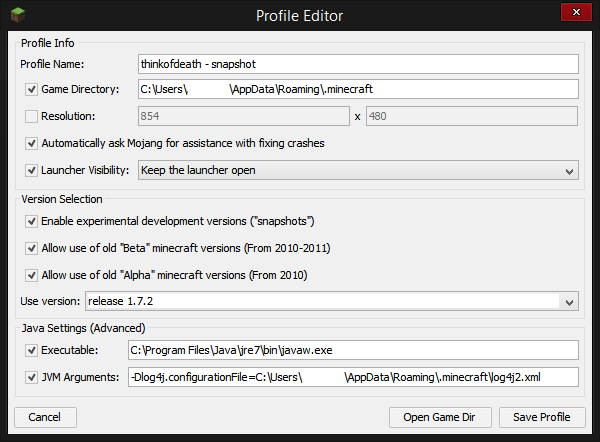
where the config file should contain <syntaxhighlight lang="xml"> <?xml version="1.0" encoding="UTF-8"?> <Configuration status="WARN" packages="net.minecraft,com.mojang">
   <Appenders>
       <Console name="SysOut" target="SYSTEM_OUT">
           <PatternLayout pattern="[%d{HH:mm:ss}] [%t/%level]: %msg%n" />
       </Console>
       <Queue name="ServerGuiConsole">
           <PatternLayout pattern="[%d{HH:mm:ss} %level]: %msg%n" />
       </Queue>
       <RollingRandomAccessFile name="File" fileName="logs/latest.log" filePattern="logs/%d{yyyy-MM-dd}-%i.log.gz">
           <PatternLayout pattern="[%d{HH:mm:ss}] [%t/%level]: %msg%n" />
           <Policies>
               <TimeBasedTriggeringPolicy />
               <OnStartupTriggeringPolicy />
           </Policies>
       </RollingRandomAccessFile>
   </Appenders>
   <Loggers>
       <Root level="debug">
           <filters>
               <MarkerFilter marker="NETWORK_PACKETS" onMatch="ACCEPT" onMismatch="NEUTRAL" />
           </filters>
           <AppenderRef ref="SysOut"/>
           <AppenderRef ref="File"/>
           <AppenderRef ref="ServerGuiConsole"/>
       </Root>
   </Loggers>
</Configuration> </syntaxhighlight>
Doing this will display some packet information in the console. Unfortunately after the netty rewrite (1.7), only packet names and IDs are shown; packet content is no longer given. Nevertheless, this information still can be useful.
[08:21:44] [Netty Client IO #0/DEBUG]: OUT: [HANDSHAKING:0] jd
[08:21:44] [Netty Client IO #0/DEBUG]: OUT: [STATUS:0] jw
[08:21:44] [Netty Client IO #0/DEBUG]:  IN: [STATUS:0] js
[08:21:44] [Netty Client IO #0/DEBUG]: OUT: [STATUS:1] jv
[08:21:44] [Netty Client IO #0/DEBUG]:  IN: [STATUS:1] jr
[08:21:52] [Netty Client IO #1/DEBUG]: OUT: [HANDSHAKING:0] jd
[08:21:52] [Netty Client IO #1/DEBUG]: OUT: [LOGIN:0] jm
[08:21:52] [Netty Client IO #1/DEBUG]:  IN: [LOGIN:1] ji
Minecraft can do even more logging should you need it, if you allow it to log all sections.
<syntaxhighlight lang="xml"> <?xml version="1.0" encoding="UTF-8"?> <Configuration status="WARN" packages="net.minecraft,com.mojang">
   <Appenders>
       <Console name="SysOut" target="SYSTEM_OUT">
           <PatternLayout pattern="[%d{HH:mm:ss}] [%t/%level]: %msg%n" />
       </Console>
       <Queue name="ServerGuiConsole">
           <PatternLayout pattern="[%d{HH:mm:ss} %level]: %msg%n" />
       </Queue>
       <RollingRandomAccessFile name="File" fileName="logs/latest.log" filePattern="logs/%d{yyyy-MM-dd}-%i.log.gz">
           <PatternLayout pattern="[%d{HH:mm:ss}] [%t/%level]: %msg%n" />
           <Policies>
               <TimeBasedTriggeringPolicy />
               <OnStartupTriggeringPolicy />
           </Policies>
       </RollingRandomAccessFile>
   </Appenders>
   <Loggers>
       <Root level="debug">
           <AppenderRef ref="SysOut"/>
           <AppenderRef ref="File"/>
           <AppenderRef ref="ServerGuiConsole"/>
       </Root>
   </Loggers>
</Configuration> </syntaxhighlight>
This will give you information about networking, sounds, authentication, and several other categories.