Wii: Difference between revisions
imported>Dazz No edit summary |
imported>Dazz No edit summary |
||
| Line 19: | Line 19: | ||
===Dolphin=== | ===Dolphin=== | ||
====Texture Dumping==== | ====Texture Dumping==== | ||
==Specific Game Pages== | |||
<DynamicPageList> | |||
category = Wii Games | |||
</DynamicPageList> | |||
{{Consoles}} | {{Consoles}} | ||
[[Category:Consoles]] | [[Category:Consoles]] | ||
Revision as of 10:19, 5 August 2014
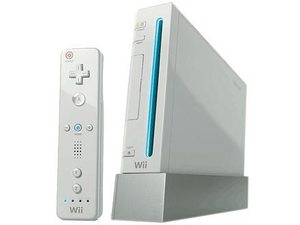
The Wii is a console created by Nintendo.
The Wii is one of the highest selling games consoles in history, and share many traits in its file-system to Nintendo previous console, the GameCube.
Ripping Tools
The Wii uses DVD-based technology, which generally would mean that files are visible from a disk through any standard ISO viewer or by inserting the DVD into your computer's disk drive. However, Nintendo specifically designed their disk drives to read files in a unique manner, making the reading on Wii game's disks require a special piece of software. There are a number of tools available.
Dolphin
It's possible to read the files from a Wii ISO through the Wii/GameCube emulator, Dolphin.
Common File Formats
BRRES
For more details on this file format, please visit the BRRES page.
A standard container file for 3D models and textures.
Suggested Emulators
Dolphin
Texture Dumping
Specific Game Pages
<DynamicPageList> category = Wii Games </DynamicPageList>
{{ #if: 2nd Generation | | }}{{ #if: 3rd Generation | | }}{{ #if: 4th Generation | | }}{{ #if: 5th Generation | | }}{{ #if: 6th Generation | | }}{{ #if: 7th Generation | | }}{{ #if: 8th Generation | | }}{{ #if: 9th Generation | | }}{{ #if: Computers | | }}{{ #if: Handhelds | | }}{{ #if: Other | | }}